Personal website using Hugo
I created this website so I can document my projects and the progress I make during the process. I decided to make the design as clear and minimalistic. Need be a I can add features or improve design without too much overhead. Incremantal change is easier to manage. Following is how I achieved it:
- Choosing the technology
- Choosing a structure
- Choosing a design and improving it
- Choosing a host
- Deployment workflow
- Final thoughts
Choosing the technology
My first choice was to use Wordpress. I created an account on the wordpress plaform, and tested the feature it had to offer. After testing it for while I had the feeling that it was a bit of an overkill for a portfolio/blog website. Looking for alternatives I stumbled over the wonderful article written by Sara Soueidan.
The article convinced me to choose Hugo as static site generator and Netlify as host. So I went on to learn a bit more about Hugo. I read through the Hugo website documentation and watched the full playlist made by Mike Dane on Youtube.
To practice the knowledge aquired, I decided not to use a Hugo theme and build the site from scratch.
An important part of the Hugo framework is structure. And it's discussed next.
Choosing a structure
Content hierarchy and structure plays a key role in Hugo. I started by setting off a basic base of template which, as the name indicates, would be the base of all the generated web-pages. Then I created the single and list templates. For the hierarchy, I have the index page sitting at the root of the site, as well as the folders for the blog, projects and contact pages. I added taxonomies later for the tags. This is the template hierarchy I ended up with:
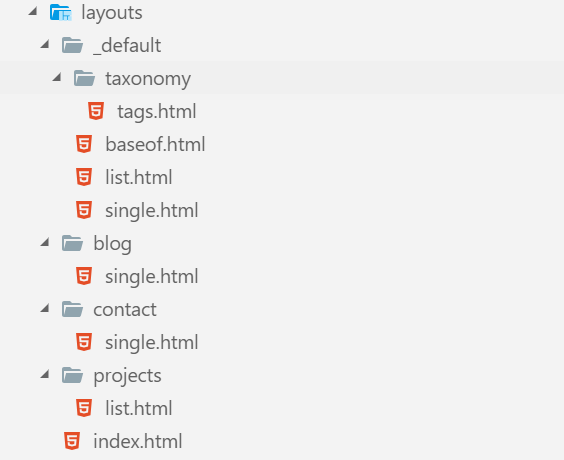
Having settled on a structure I moved on to the design phase.
Choosing a design and improving it
I used a basic Bootstrap setup to syle the website. I could have chosen to use CSS directly but I was already using Bootstrap and this allowed me to go faster with a satisfactory result. I started the design with a very basic setup. Then I saw a tweet from Sara Soueidan regarding the book "Refactoring UI" by Steve Schoger. I got curious and saw how much praise it got. So I decided to invest in it. The book was very clear and concise. It helped immensely with refactoring the UI. Having finished the design and content, it was time to put the site online.
Choosing a host
Having read the Sara Soueidan article, it was a no brainer choosing the Netlify platform. Especially that they have great integration for Hugo's framework. One of the feature that Netlify provides is a great CI/CD with GitHub
Deployment workflow
The deployment workflow as provided by Netlify is very straightforward. You link a Git repo to the site created on Netlify. Then you push your local branch to your GitHub remote. Every time there is a push to the remote repo, it gets deployed to the site automatically. Netlify also has a feature that allows viewing a feature branch, for example with a custom URL alongside your live site. For example, mywebsite.com would have the custom link feature-test.mywebsite.com where you can view and test the feature live. All that is required is to do a pull request on the repo with the new branch and Netlify will add the custom link as a comment on the pull request. Neat!!! And with that my personal Hugo website was online.
Final thoughts
Overall the experience creating the website was great. Learning about the Hugo framework, understanding basic Go syntax, and improving my Bootstrap and CSS skills was an amazing experience. And an ongoing one.